Release Notes
SenseCraft Seeedash (SenseCraft HMI) v1.6.0 Release Notes
Section titled “SenseCraft Seeedash (SenseCraft HMI) v1.6.0 Release Notes”Release time: 2026.09.23
We are excited to announce a new version of the SenseCraft Seeedash Web platform. This update brings powerful new widget features, enhanced customization, multi-language support, and critical bug fixes to improve your dashboard design experience.
🚀New Features
Section titled “🚀New Features”Google Calendar Widget
Section titled “Google Calendar Widget”- Multi-Calendar Support: Now supports multiple calendars under the same Google account, including shared calendars.
- Monthly View: Added a new monthly view mode to display all events within a month, optimized for large screens.
- Schedule/List View: Added a schedule display mode that lists events chronologically (list format) instead of a traditional grid/table format.
Stock / Crypto Price Widget
Section titled “Stock / Crypto Price Widget”- Preset Previews: Added preset previews, allowing users to quickly apply and call the widget in the Group View.
Third-Party External Data Sources Widget
Section titled “Third-Party External Data Sources Widget”- Group Data Import: Now supports importing returned data groups directly into the Designer as a Group.
Weather Widget
Section titled “Weather Widget”- Pure White Icons: Added a Reverse Feature for the weather icons to the right Inspector Panel, designed to cover designs with dark backgrounds.
Gauge Widget
Section titled “Gauge Widget”- Onboard Sensor Integration: The Gauge component now supports displaying onboard temperature, humidity, and battery level.
Multi-Language Interface Support
Section titled “Multi-Language Interface Support”- Extended Language Options: In addition to Chinese and English, we have added support for Japanese, German, French, Dutch, Spanish, and Polish in the User Center under Account & Security.
- Widget Localization: Widgets (including 30-day Calendar, Weather, and Weekday) now support following the user interface language settings, displaying content in the user’s selected language.
Designer Enhancements
Section titled “Designer Enhancements”- Position & Size: The adjustment options for size and coordinates have returned. You can now find these fine-grained control options under Position & Size in the right Inspector Panel, visible when needed.
- Touchpad Gestures for Canvas Pan: Added touchpad gesture support to pan the entire canvas, making navigation easier when the canvas is zoomed in.
- Canvas Rotation: Added a canvas rotation feature, allowing you to adjust the display content for development boards with a single click.
Improved Device Page/Photo Management
Section titled “Improved Device Page/Photo Management”- Deployed pages and photos are now displayed as clear cards within the device detail view. Click any card to edit and adjust it directly.
Other Improvements
Section titled “Other Improvements”- The main menu bar is updated to show icons only; text labels appear on hover for better multi‑language support.
- Within Workspace, multi‑selection is enabled for My Designs and My Photos. Bulk deployment of selected items to multiple devices streamlines content management for multi‑device users. My Playlist also supports pushing the same playlist to multiple devices of identical resolution.
🐛 Bug Fixes
Section titled “🐛 Bug Fixes”- HTML Widget Optimization:
- Increased the loading timeout to 3 seconds to capture a screenshot for the preview.
- Added a note in the “HTML live iframe” component description regarding the timeout duration.
- An error prompt will now be displayed upon timeout instead of showing a blank frame.
- Top Toolbar Duplicate Fix: Fixed an issue where images could not adjust their layers, and shapes could not adjust their position coordinates after using the “Duplicate” function in the top toolbar.
- External API Currency Symbol: Fixed an issue where the currency symbol for imported data from External APIs always displayed as ”$”, regardless of the currencyUnit setting.
- External API Image Resizing: Fixed an issue where images returned by the External API component would automatically reset to an incorrect size when reopening the design or canvas view.
- Text Box Auto-Sizing: Fixed an issue where data-type text boxes (such as time) would experience number truncation after the data values changed, ensuring the text box adapts to the length correctly.
reTerminal E1001-E1004 v1.2.2 Stock Firmware Release Notes
Section titled “reTerminal E1001-E1004 v1.2.2 Stock Firmware Release Notes”Release time: 2026.09.10
This firmware update focuses on more reliable screen refreshes, consistent update schedules, and reduced battery drain caused by refresh issues.
Bug Fixes
Section titled “Bug Fixes”- Resolved occasional screen freezes during refresh and related battery drain.
- Automatic refresh schedules now stay on track after the daily 4:30 AM screen maintenance.
- Fixed the issue where saved content failed to refresh after wake-up despite Wi-Fi being connected.
Thank you for sharing your feedback! If you experience any issues, please let us know in our Discord channel.
SenseCraft Seeedash (SenseCraft HMI) v1.5.0 Release Notes
Section titled “SenseCraft Seeedash (SenseCraft HMI) v1.5.0 Release Notes”Release time: 2026.07.15
To better support the upcoming launch of reTerminal Sticky (our 3.97” monochrome ePaper AI Sticky Note) at the end of July, we’ve made several major updates across the platform.
Key Changes
Section titled “Key Changes”- SenseCraft HMI is now SenseCraft Seeedash – with a new icon. The mobile app and web platform are now fully connected, allowing Sticky users to access their web‑saved designs and uploaded photos directly from the Seeedash mobile app. You can also upload images and create simple dashboards using the Seeedash mobile app on the go.
- Home Page – added template search, sorting options (Newest, Most Added, Most Viewed, Most Liked), and device‑based filtering to quickly find compatible templates.
Workspace & Designer Updates
Section titled “Workspace & Designer Updates”- Workspace now organizes content into three categories: My Designs, My Photos, and My Playlists – making it easier to create album‑style slideshows.
- One‑click deployment on the web Designer now filters compatible devices based on design resolution.
- When publishing a template, the design preview is automatically used as the cover image – but you can replace it with your own photo.
Sidebar & Navigation
Section titled “Sidebar & Navigation”- Language settings moved to Account & Security under user profile avatar – defaults to your browser language.
- All documentation links are now grouped under a single Docs entry in the sidebar.
- Added a Products entry, linking to the full list of all compatible products: https://sensecraft.seeed.cc/hmi/products
New Product Support
Section titled “New Product Support”- Sticky now appears in the device tab, with separate playlists for designs and photos in the device details view.
- Sticky is also added to the Products page with links, and shown on the Device page when there is no added device with a direct link.
What’s Still in Progress
Section titled “What’s Still in Progress”This release took longer than expected. Some Google Calendar improvements that were previously requested are still pending, as the team prioritized Sticky support and the Seeedash mobile app. We’ve been tracking your feedback and will continue to address it.
Moving forward, feel free to share feature requests or bug reports via our SenseCraft Seeedash Open Roadmap or our Discord channel.
Thank you for your patience and support – and we look forward to the next release! SenseCraft Seeedash Team
SenseCraft HMI v1.4.0 Release Notes
Section titled “SenseCraft HMI v1.4.0 Release Notes”Release time: 2026.04.10
This release was split across two weeks (last week + today). Sorry for no heads-up last time. Going forward, we’re opening up our dev roadmap and collecting feedback in a public doc.
Designer Updates
Section titled “Designer Updates”Weather Widget
Section titled “Weather Widget”- New parameters: Date, Daily Average Temperature, Weather Code in Text, and many more
- Unit settings: now you can choose which temperature/speed/rain sum units to display
- Configuration UI redesigned: selected parameters now appear as grouped elements, with chart previews for numeric parameters. However, you can still stick to the original “Available Field” to select the parameters
- Added 4 preset widgets: Current Weather, Compact Weather Card, 7-Day Forecast, 5-Day Forecast with Date
Calendar Widget
Section titled “Calendar Widget”- Added “Week starts on” setting – choose Sunday or Monday
Timezone Optimization
Section titled “Timezone Optimization”- Timezone handling for Date/Time/Clock/Calendar/Day Counter Widgets switched from UTC to IANA-based (includes daylight saving natively)
Other Improvements
Section titled “Other Improvements”- Draw Widget moved from Top Toolbar to Basic Widgets, now supports stroke and pattern settings
- Multi-component logic inside Groups improved
- Inspector Panel heavily trimmed: only the most essential settings remain. Cleaner, less overwhelming
SenseCraft HMI Core
Section titled “SenseCraft HMI Core”- Sidebar secondary menus now expand on hover – more room for the canvas designer
- Sidebar now has the SenseCraft HMI icon logo at the top
- Homepage added a banner section for important news and updates
- Workspace now shows Add New, My Page, My Playlist all on one page – cleaner entry points
- My Page aggregates all Designs and uploaded Images. Edit icon in top-right enables batch actions (Apply to Device, Delete)
- Clicking +New gives two options: create a Design from scratch, or upload photos to make an Album
- Choosing +Design from scratch now guides you through naming your design and selecting the target device screen size
- Firmware Flasher and Image Dithering tools got a UI refresh
- Each tool now includes a description, when to use it, and helpful tips
New Hardware Support
Section titled “New Hardware Support”- Added support for 10.3” 16-grayscale ePaper Display reTerminal E1003
Roadmap & Feedback Channels
Section titled “Roadmap & Feedback Channels”To better manage releases and collect community feedback, we’re now sharing our development roadmap in a public Google Doc called SenseCraft HMI Open Roadmap.
If you have feature requests or run into issues, you can:
- Leave a comment directly in the Google Doc (we’ll review regularly)
- Or reach out on SenseCraft HMI Discord channel as we also pull feedback from there and update the doc
Thanks as always for your support! 💚 SenseCraft HMI Team
SenseCraft HMI v1.3.2 Release Notes
Section titled “SenseCraft HMI v1.3.2 Release Notes”Update time: 2026.02.28
🚀 New Features
- Component Widgets: hosts widgets of Calendar, Clock, List, Table, and Data Chart
- Data Chart Widgets: New chart components supporting line, bar, candlestick, scatter, pie charts, and gauges — optimized for visualization of SenseCAP historical data, stock market, and your any other data
- HTML & RSS Redesign: Now integrated as widgets within Canvas Editor’s Data Widgets section
- HTML Widget supports both web URL embedding and local HTML file upload/rendering
- RSS Widget seamlessly embeds RSS feeds as an element into your canvas
🐛 Bugs Fixed & Improvements
- Calendar Widget: Optimized table styling and interaction logic
- Flip Clock Widget:
- Preview and Apply to Device now reflect user’s timezone customizations
- Fixed component disappearance issue after resizing
- Google Calendar Widget: Fixed timezone display issue (addressed in v1.3.1)
- Auto-save Enhancement: Designs are now automatically saved when users click Apply, Preview, Publish, or Private Share (located in Dev Tool) — no manual save needed
- My Page Updates: Now displays all Canvas Designs by default (including all past Design, RSS, and Web HTML pages). User-uploaded Image pages can be accessed via the dropdown menu in the top-right corner
- SenseCraft HMI Homepage Featured:
- Added social metrics (views, likes, no. of add-to-my page) to the Featured Banner
- New “Featured” Category showcasing all previously featured designs
- Device Support Updates: Added the 13.3” EINK Spectra full-color displays reTerminal E1004 and XIAO EE02 DIY ePaper Kit to homepage and device setup pages with product info and links
🌟 Get Involved Try the new release and share your feedback! Report bugs, suggest new features, and help shape our roadmap on Discord: https://discord.com/invite/Jj2CBXCjtf
SenseCraft HMI v1.3.0 Release Notes
Section titled “SenseCraft HMI v1.3.0 Release Notes”Update time: 2026.01.30
🚀 Toward a UI Template Community This release transforms SenseCraft HMI into a collaborative platform. Now you can publish, discover, and reuse UI templates built by the community in a more collaborative way.
-
Redesigned Homepage
- Featured Templates spotlight outstanding designs.
- Filter templates by category using the new top navigation bar.
- Updated Footer includes quick links to Change Logs, About, Support, and more.
-
Publish Pages as Public Templates
- A new “Publish” button is available on the pages.
- Submit your page with a picture, title, category, and description—once approved, it becomes a public template.
- Track submission status (Under Review, Published, or Rejected) in your User Profile Center (click the user avatar on the Side Bar to access).
-
Enhanced User Profiles
- Customize your public profile with an avatar, bio, and social links.
-
Community Feedback & Workflow
- Browse, like, and directly “Add to My Pages” any published template.
- Your feedback helps creators and improves the template ecosystem.
🐛 Bugs Fixed & Improvements
- 4‑Level Grayscale Support Update: Fixed for reTerminal E1001–E1004 with the new firmware V1.1.1. → Update firmware directly via the Tools Bar in SenseCraft HMI.
- Google Calendar Timezone: Resolved synchronization issues across different time zones.
- Platform Version Visibility: Find the current version in the Release Notes icon (above Doc Center on the Side Bar) or in the Change Logs (footer).
🌟 Get Involved
- Share Your Designs: Publish your best pages as public templates and inspire the community. Outstanding templates will be featured on the homepage banner!
- Join the Conversation: Report bugs, share feedback, and help shape our roadmap on Discord.
SenseCraft HMI v1.2.6 Release Notes
Section titled “SenseCraft HMI v1.2.6 Release Notes”Update time: 2026.01.19
Canvas Designer Improvements
- Shortcuts & Right-Click Menu for faster editing:
Ctrl+C: CopyCtrl+V: PasteCtrl+X: CutCtrl+D: DuplicateCtrl+Z: UndoCtrl+B: Toggle bold textCtrl+I: Toggle italic text
- Right-click any element to open a contextual menu (Copy, Duplicate, Layer, Group, Add to My Widgets)
- New Basic Elements: Clock (Analog & Flip), Calendar, List, and Table
- Enhanced Data Integration:
- Google Calendar (verified, multiple event types supported)
- Layout improvements for Todoist, Reddit, and HackerNews
- Updated UI design application process in the Canvas
- Group Function Upgrade:
- Synchronized resizing for all components within a group
- Batch property editing for similar components (e.g., text color, size, weight)
- Text Element Enhancements:
- Customizable background color, padding, and shadow styles
- Adaptive selection box and automatic line wrap during drag-and-drop
- Canvas Zoom Optimization:
- Finer zoom control for detailed adjustments and improved usability
New Hardware Support
- reTerminal E1003 (10.3″ Monochrome),launching soon
- reTerminal E1004 (13.3″ Spectra Full Color),launching soon
- EE02 Dev Kit with 13.3″ Spectra Full Color Display
Other Updates
- Restored advanced developer tools for UI config JSON import/export
- Added Page Duplicate feature in My Pages
Get Involved Report bugs and help shape our roadmap by joining our Discord community #sensecraft-hmi!
SenseCraft HMI v1.2.0 Release Notes
Section titled “SenseCraft HMI v1.2.0 Release Notes”Update time: 2025.12.25
Highlights
- New Homepage with Rich Templates – Ready-to-use designs for weather, calendars, crypto, stocks, quotes, and more.
- New Architecture – Design your UI before hardware arrives. The platform now clearly separates Workspace (design), Device (deployment), Tools and AI Gen (Beta).
- Expanded Data Sources – Live integration with ZenQuotes, Google Calendar, CoinMarketCap, Todoist, and others.
- Modern Redesign – Refreshed UI across the entire platform.
- New Hardware – TRMNL 7.5” (OG) DIY Kit support.
- Always-On Mode – New Always-On display mode with faster response.
- Third-Party Authentication- Support for Google and GitHub login apart from the oringinal SenseCraft email login
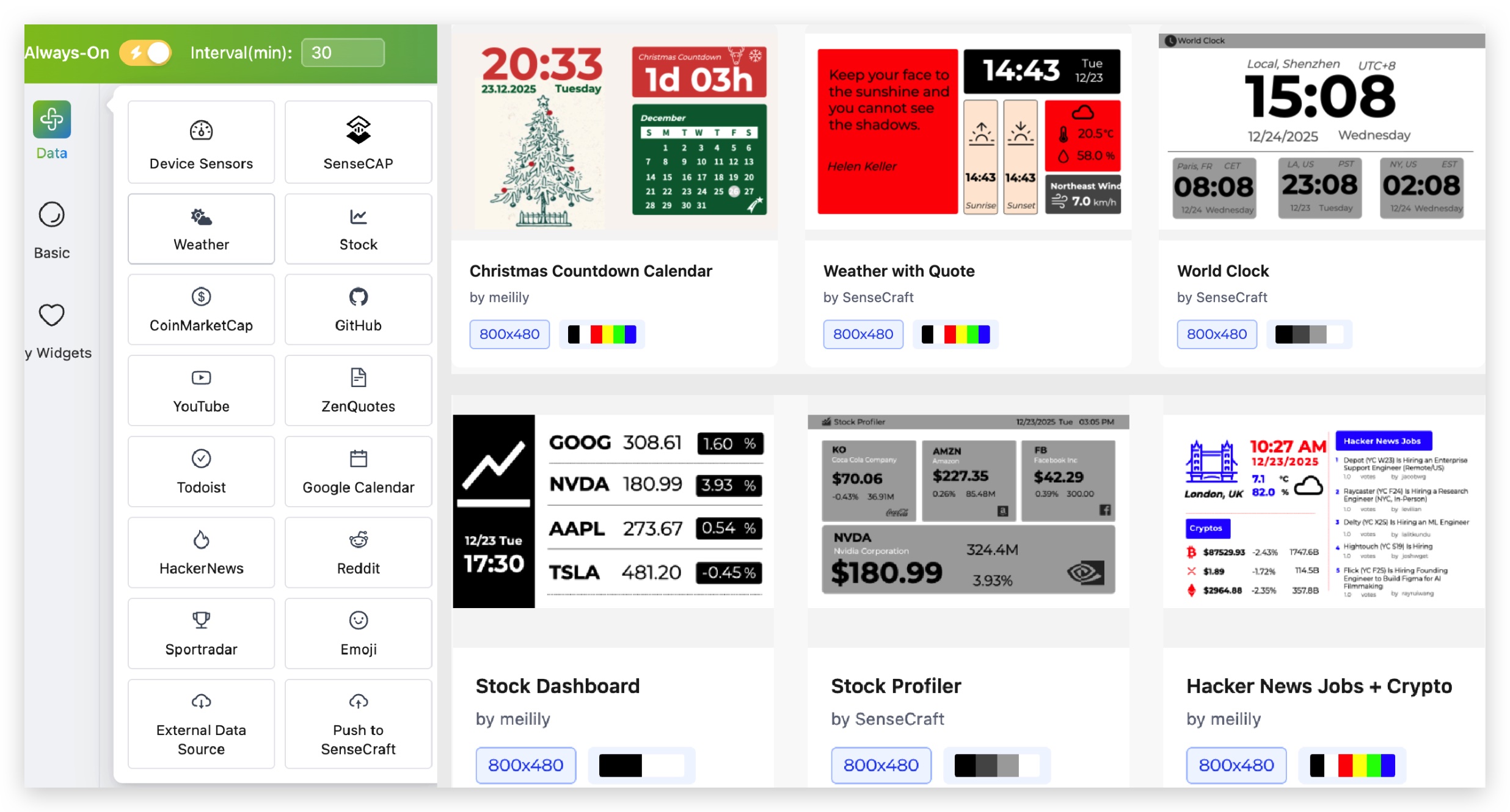
New Platform Layout
- Home – Browse templates and apply your favorites to your canvas
- Workspace – Design UI pages and playlists
- Device – Manage connected devices
- Tools – Firmware Flasher, image dithering
- AI Gen (Beta) – AI-powered image and layout generation
Improvements
- Improved 4-level grayscale dithering (2.9” displays)
- Fixed pairing code issue (XIAO EE04)
- Smoother canvas rotation
- Better preview rendering
Get Involved
Join our Discord to vote on templates, report bugs, and help shape our roadmap.
Discord Channel: https://discord.com/invite/Jj2CBXCjtf
🎄 Merry Christmas!
🧑🎄 Team SenseCraft HMI
SenseCraft HMI v1.1.0 Release Notes
Section titled “SenseCraft HMI v1.1.0 Release Notes”Update time: 2025.11.20
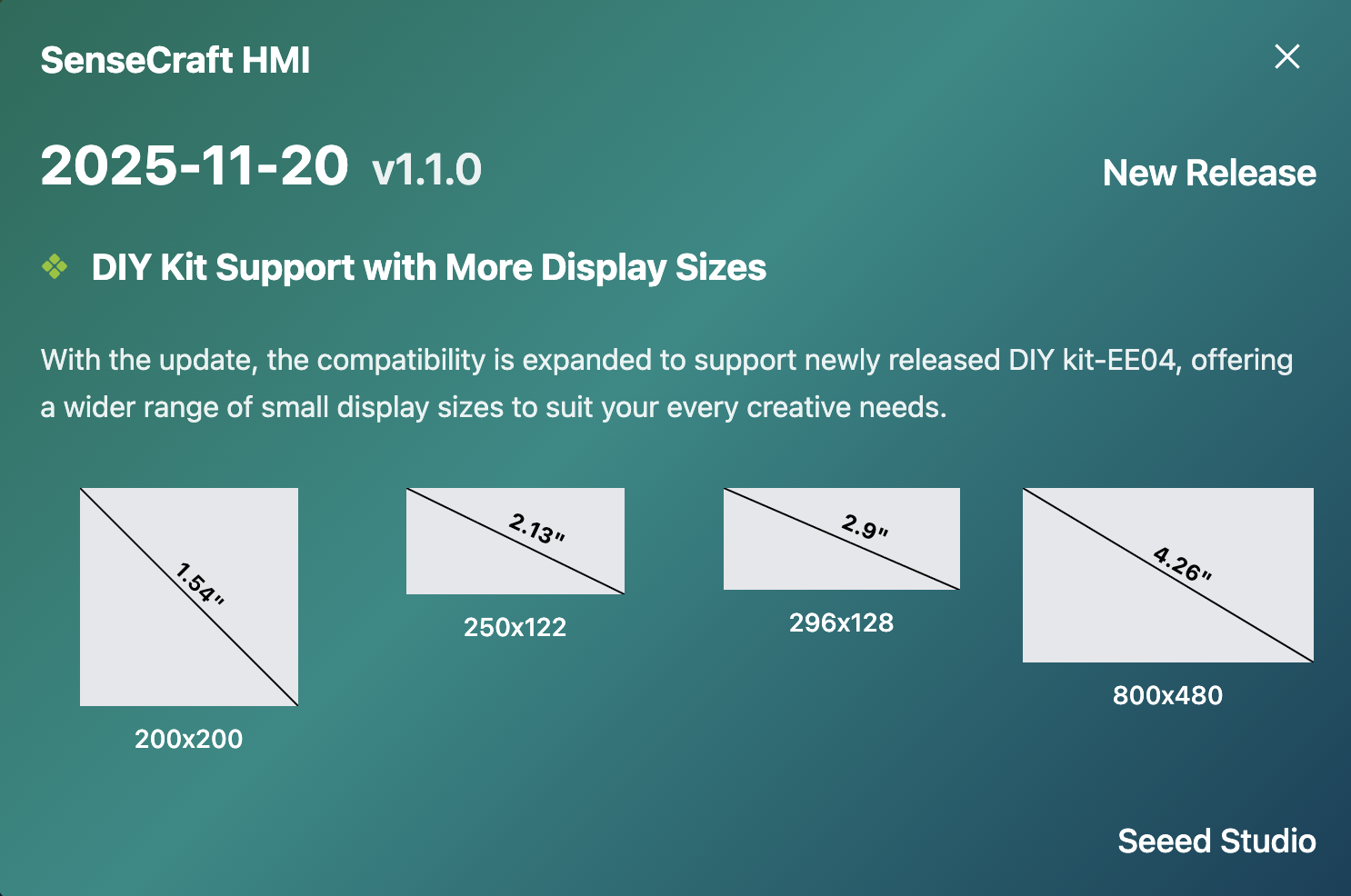
New: XIAO EE04 ePaper DIY Kit Support (ESP32-S3)
We’ve expanded compatibility to support the newly released EE04 DIY Kit, offering a wider range of ePaper displays (1.54” to 7.5”) for your creative projects.
Supported Display Types: • Monochrome (black & white) • 4-color displays • 6-color displays (E Ink Spectra 6 Full-color)
SenseCraft HMI v1.0 Release Notes
Section titled “SenseCraft HMI v1.0 Release Notes”Update time: 2025.10.24
Re-Designed Layout & Pagelist for Easier Creation
- New UI layout for easier navigation
- Add pagelist feature, create multiple UIs like keynotes slides
- Add page libraries, save all your UIs
Enhanced UI Editor and Data Integration
- Support for both horizontal and vertical canvas layouts
- Support UI template import and export
- Directly pull live SenseCAP data from your account
- Add device last online time and next refresh time
Expanded Hardware Support
- Support ePaper DIY Kit-EE04, compatible with 7.3” and 7.5” displays
- Support TRMNL 7.5” (OG) DIY Kit with 7.5” display
Firmware Flash and Image Processing Tool Page
- Supports flashing both SenseCraft HMI firmware and TRMNL firmware
- Add dithering tool to process image and export directly to x.c files
SenseCraft HMI v0.6 Release Notes
Section titled “SenseCraft HMI v0.6 Release Notes”Update time: 2025.9.23
Initial Release
- Device support: reTerminal E1001 and E1002
- Page types: Individual gallery, canvas, RSS, and web page support
- Firmware management: Online firmware flashing and updates
For more detailed information about each feature, please refer to the corresponding guide sections.